


此时默认已经创建好了minio
创建存储
在 MinIO(以及所有兼容 S3 的对象存储系统)中,桶(Bucket) 是最顶层的逻辑存储单元,可以理解为一个“命名空间”或“大文件夹”,它是所有对象(文件)的容器。
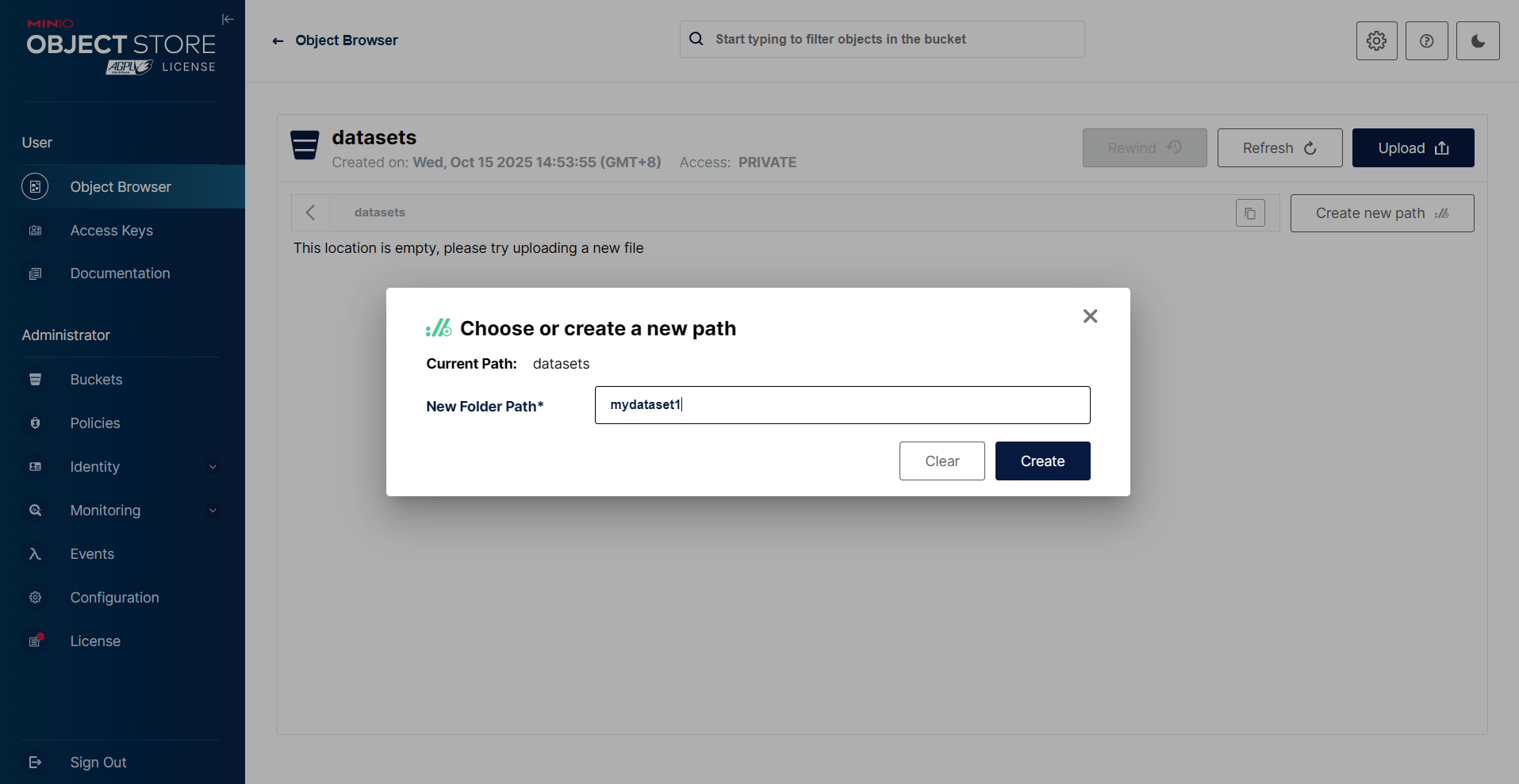
MinIO 不存在真正的目录结构,而是通过对象 key 的前缀来模拟目录层级。
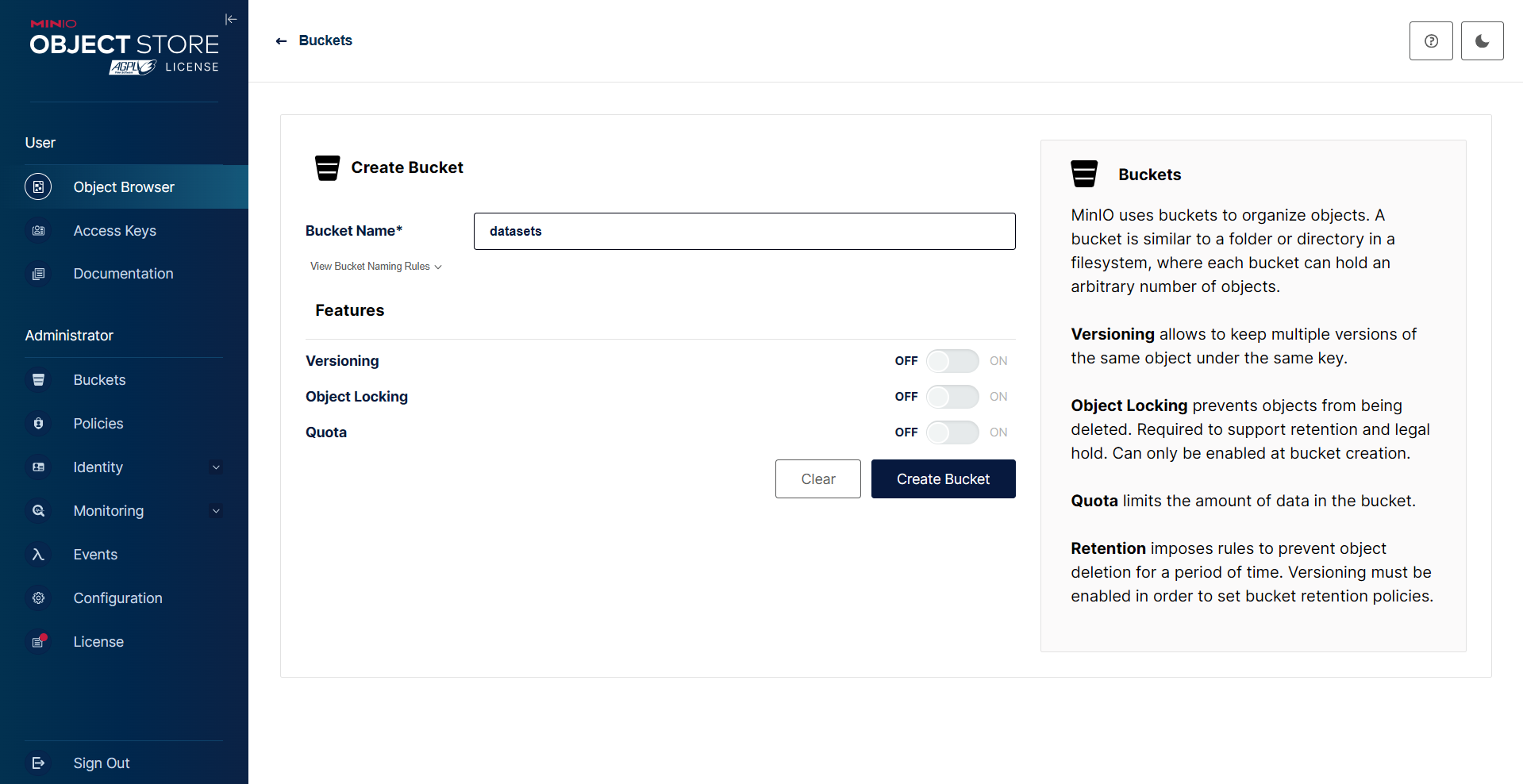
我们可以在存储通下创建路径及上传文件
访问策略
我们需要将访问策略从private变成public。
此时我们可以访问http://XXXIP:9000/datasets/mydataset1/yuanshen01.jpg 来访问上传的图片了。
代码操作
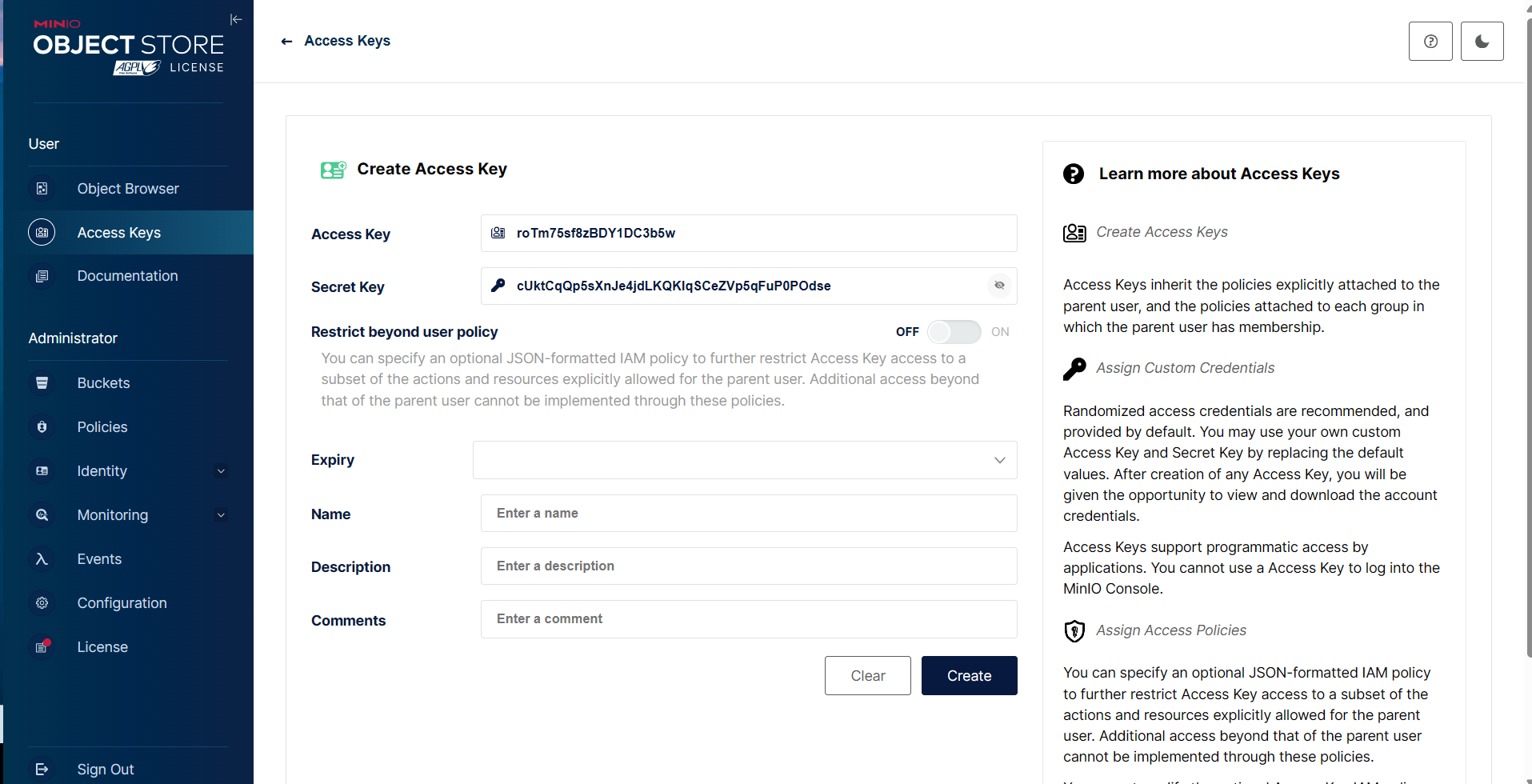
创建Access Key
添加依赖
<dependency>
    <groupId>io.minio</groupId>
    <artifactId>minio</artifactId>
    <version>8.5.10</version>
</dependency>
可能会遇到okhttp的依赖报错
okhttp依赖冲突造成的服务启动失败,因为minio底层要依赖okhttp进行和minio服务端进行通信,由于项目中多个依赖底层都依赖了不同版本的okhttp,导致这里的okhttp因版本不同,某些方法不可用,尝试降级minio的版本解决问题
或者添加引入版本在4.8.1以上的okhttp依赖
<dependency>
    <groupId>com.squareup.okhttp3</groupId>
    <artifactId>okhttp</artifactId>
    <version>4.8.1</version>
    <scope>compile</scope>
</dependency>
测试代码
配置yml文件
minio:
  enable: true
  endpoint: http://*:9000
  fileUploadUrl: http://*:9000
  accessKey: *
  secretKey: *
  bucket-name: datasets
系统加载minio配置
@Data
@Configuration
@ConfigurationProperties(prefix = "minio")
public class MinioConfig {

    @Value("${minio.endpoint}")
    private String endpoint;
    @Value("${minio.accessKey}")
    private String accessKey;
    @Value("${minio.secretKey}")
    private String secretKey;
    @Value("${minio.bucket-name}")
    private String bucketName;

    @Bean
    public MinioClient minioClient() {
        return MinioClient.builder()
                .endpoint(endpoint)
                .credentials(accessKey, secretKey)
                .build();
    }
}
minio工具类
@Component
@Slf4j
@ConditionalOnProperty(name = "minio.enable", havingValue = "true")
public class MinioUtil   implements StoreService{
    @Resource
    private MinioClient minioClient;

    @Autowired
    private MinioConfig minioConfig;
    /**
     * 查看存储bucket是否存在
     * @return boolean
     */
    public Boolean bucketExists(String bucketName) {
        Boolean found;
        try {
            found = minioClient.bucketExists(BucketExistsArgs.builder().bucket(bucketName).build());
        } catch (Exception e) {
            //e.printStackTrace();
            return false;
        }
        return found;
    }
    /**
     * 创建存储bucket
     * @return Boolean
     */
    public Boolean makeBucket(String bucketName) {
        try {
            minioClient.makeBucket(MakeBucketArgs.builder()
                    .bucket(bucketName)
                    .build());
        } catch (Exception e) {
            e.printStackTrace();
            return false;
        }
        return true;
    }
    /**
     * 删除存储bucket
     * @return Boolean
     */
    public Boolean removeBucket(String bucketName) {
        try {
            minioClient.removeBucket(RemoveBucketArgs.builder()
                    .bucket(bucketName)
                    .build());
        } catch (Exception e) {
            e.printStackTrace();
            return false;
        }
        return true;
    }
    /**
     * 获取全部bucket
     */
    public List<Bucket> getAllBuckets() {
        try {
            return minioClient.listBuckets();
        } catch (Exception e) {
            e.printStackTrace();
        }
        return null;
    }
    /**
     * 文件上传
     * @param file 文件
     * @return Boolean
     */
    public Boolean upload(String bucketName, String fileName, MultipartFile file, InputStream inputStream) {
        try {
            PutObjectArgs objectArgs = PutObjectArgs.builder().bucket(bucketName).object(fileName)
                    .stream(inputStream,file.getSize(),-1).contentType(file.getContentType()).build();
            //文件名称相同会覆盖
            minioClient.putObject(objectArgs);
        } catch (Exception e) {
            e.printStackTrace();
            return false;
        }
        return true;
    }
    /**
     * 预览图片
     * @param fileName
     * @return
     */
    public String preview(String fileName,String bucketName){
        // 查看文件地址
        GetPresignedObjectUrlArgs build = new GetPresignedObjectUrlArgs().builder().bucket(bucketName).object(fileName).method(Method.GET).build();
        try {
            String url = minioClient.getPresignedObjectUrl(build);
            return url;
        } catch (Exception e) {
            e.printStackTrace();
        }
        return null;
    }
    /**
     * 文件下载
     * @param fileName 文件名称
     * @param res response
     * @return Boolean
     */
    public void download(String fileName,String bucketName, HttpServletResponse res) {
        GetObjectArgs objectArgs = GetObjectArgs.builder().bucket(bucketName)
                .object(fileName).build();
        try (GetObjectResponse response = minioClient.getObject(objectArgs)){
            byte[] buf = new byte[1024];
            int len;
            try (FastByteArrayOutputStream os = new FastByteArrayOutputStream()){
                while ((len=response.read(buf))!=-1){
                    os.write(buf,0,len);
                }
                os.flush();
                byte[] bytes = os.toByteArray();
                res.setCharacterEncoding("utf-8");
                //设置强制下载不打开
                //res.setContentType("application/force-download");
                res.addHeader("Content-Disposition", "attachment;fileName=" + fileName);
                try (ServletOutputStream stream = res.getOutputStream()){
                    stream.write(bytes);
                    stream.flush();
                }
            }
        } catch (Exception e) {
            e.printStackTrace();
        }
    }
    /**
     * 查看文件对象
     * @return 存储bucket内文件对象信息
     */
    public List<Item> listObjects(String bucketName) {
        Iterable<Result<Item>> results = minioClient.listObjects(
                ListObjectsArgs.builder().bucket(bucketName).build());
        List<Item> items = new ArrayList<>();
        try {
            for (Result<Item> result : results) {
                items.add(result.get());
            }
        } catch (Exception e) {
            e.printStackTrace();
            return null;
        }
        return items;
    }
    /**
     * 删除
     * @param fileName
     * @return
     * @throws Exception
     */
    public boolean remove(String fileName,String bucketName){
        try {
            minioClient.removeObject( RemoveObjectArgs.builder().bucket(bucketName).object(fileName).build());
        }catch (Exception e){
            return false;
        }
        return true;
    }
    /**
     * 批量删除文件对象(没测试)
     * @param objects 对象名称集合
     */
    public Iterable<Result<DeleteError>> removeObjects(List<String> objects, String bucketName) {
        List<DeleteObject> dos = objects.stream().map(e -> new DeleteObject(e)).collect(Collectors.toList());
        Iterable<Result<DeleteError>> results = minioClient.removeObjects(RemoveObjectsArgs.builder().bucket(bucketName).objects(dos).build());
        return results;
    }
    //上传文件,返回路径
    @Override
    public FileVO saveFile(FileVO fileVO) {
        MultipartFile file=fileVO.getFile();
        try {
            if (!this.bucketExists("file")) {
                this.makeBucket("file");
            }
            InputStream inputStream = file.getInputStream();
            String fileName = file.getOriginalFilename();
            String newName = UUID.randomUUID().toString().replaceAll("-", "")
                    + fileName.substring(fileName.lastIndexOf("."));
            this.upload(minioConfig.getBucketName(), newName,file, inputStream);
            inputStream.close();
            String fileUrl = this.preview(newName,"file");
            String fileUrlNew=fileUrl.substring(0, fileUrl.indexOf("?"));
            fileUrlNew=fileUrlNew.replace("http://","");
            FileVO result = new FileVO();
            result.setAbsolutePath(fileUrlNew);
            result.setVisitPath(fileUrlNew);
            return result;
        } catch (Exception e) {
            e.printStackTrace();
        }
        return null;
    }

    @Override
    public String getStoreName() {
        return StoreEnum.MINIO.getCode();
    }

    @Override
    public void deleteFile(List<String> files) {
        for (String fileName : files){
            try {
                String name = extractFileName(fileName);
                RemoveObjectArgs args = RemoveObjectArgs.builder().bucket(minioConfig.getBucketName())
                        .object(name)
                        .build();
                try {
                    minioClient.removeObject(args);
                } catch (Exception e) {
                    e.printStackTrace();
                }
          minioClient.removeObject(RemoveObjectArgs.builder().bucket(minioConfig.getBucketName()).object(fileName).build());
            } catch (Exception e) {
                e.printStackTrace();
            }
        }
    }

    public static String extractFileName(String path) {

        int startIndex = path.indexOf("file/");
        if (startIndex == -1) {
            throw new IllegalArgumentException("路径中不包含 'file/'");
        }
        startIndex += "file/".length();
        return path.substring(startIndex);
    }
}
编写updatacontroller
 @PostMapping("/upload")
    @LoginCheck
    public UResult<String> upload(@RequestParam("file") MultipartFile file, FileVO fileVO) {
        if (file == null || !StringUtils.hasText(fileVO.getType()) || !StringUtils.hasText(fileVO.getRelativePath())) {
            return UResult.fail("文件和资源类型和资源路径不能为空!");
        }

        fileVO.setFile(file);
        StoreService storeService = fileStorageService.getFileStorage(fileVO.getStoreType());
        FileVO result = storeService.saveFile(fileVO);


        Resource re = new Resource();
        re.setPath(result.getVisitPath());
        re.setType(fileVO.getType());
        re.setSize(Integer.valueOf(Long.toString(file.getSize())));
        re.setMimeType(file.getContentType());
        re.setStoreType(fileVO.getStoreType());
        re.setUserId(UBUtil.getUserId());
        resourceService.save(re);
        return UResult.success(result.getVisitPath());
    }
/**
* 储存服务
*/
public interface StoreService {
void deleteFile(List<String> files);
FileVO saveFile(FileVO fileVO);
String getStoreName();
}StoreService是定义的一个存储服务的接口,下面有多个实现类,根据前端传入的StoreType进行判断
备份数据
使用
mc cp命令进行备份使用
MinIO客户端 api 进行编程备份与
Amazon S3使用 Reclone 等工具进行备份如果是集群,在集权之间进行复制
快照和版本控制
参考链接:
https://mp.weixin.qq.com/s/O2LRtqjgfwVOGMu5YY9sNA
https://mp.weixin.qq.com/s/zT37cIyy0sSoX7aFUxnhww
https://mp.weixin.qq.com/s/1RzkU5oBijAoVTt84TCRwQ